Describe the bug
Custom filterConfig.yml is not working after our projects were updated to .NET 7.
To Reproduce
Steps to reproduce the behavior:
- Use DocFx on a C# project which targets .NET 7
- Have a custom filter enabled
 "metadata": [
    {
       ...
      "filter": "filterConfig.yml"
       ....
    }
  ],
Expected behavior
Custom filter works.
Context:
-
OS: Windows 10
-
Docfx version: 2.59.4
-
.NET version: .NET 7.0
-
docfx.json config
{
  "metadata": [
    {
     "src": [
        {
          "files": [
            "**.csproj"
          ],
          "src": "../MyProjectFolder"
        }
      ],
      "dest": "api",
      "disableGitFeatures": false,
      "disableDefaultFilter": false,
      "filter": "filterConfig.yml"
    }
  ],
  "build": {
    "content": [
      {
        "files": [
          "api/**.yml",
          "api/index.md",
          "api/**.md"
        ]
      },
      {
        "files": [
          "articles/**.md",
          "articles/**/toc.yml",
          "toc.yml",
          "*.md"
        ]
      }
    ],
    "resource": [
      {
        "files": [
          "images/**",
          "api/extra/*.jpeg",
          "api/extra/*.png",
          "api/extra/*.gif",
          "api/extra/*.jpg"
        ]
      }
    ],
    "overwrite": [
      {
        "files": [
          "apidoc/**.md"
        ],
        "exclude": [
          "obj/**",
          "_site/**"
        ]
      }
    ],
    "dest": "_site",
    "globalMetadataFiles": [],
    "fileMetadataFiles": [],
    "template": [
      "default",
      "templates/darkfx"
    ],
    "postProcessors": [ "ExtractSearchIndex" ],
    "globalMetadata": {
      "_enableSearch": "true"
    },
    "markdownEngineName": "markdig",
    "noLangKeyword": false,
    "keepFileLink": false,
    "cleanupCacheHistory": false,
    "disableGitFeatures": false
  }
}
.NET SDK:
 Version:   7.0.101
 Commit:    bb24aafa11

Runtime Environment:
 OS Name:     Windows
 OS Version:  10.0.19044
 OS Platform: Windows
 RID:         win10-x64
 Base Path:   C:\Program Files\dotnet\sdk\7.0.101\

Host:
  Version:      7.0.1
  Architecture: x64
  Commit:       97203d38ba

.NET SDKs installed:
  2.1.818 [C:\Program Files\dotnet\sdk]
  3.1.426 [C:\Program Files\dotnet\sdk]
  6.0.301 [C:\Program Files\dotnet\sdk]
  6.0.307 [C:\Program Files\dotnet\sdk]
  7.0.101 [C:\Program Files\dotnet\sdk]

.NET runtimes installed:
  Microsoft.AspNetCore.All 2.1.30 [C:\Program Files\dotnet\shared\Microsoft.AspNetCore.All]
  Microsoft.AspNetCore.App 2.1.30 [C:\Program Files\dotnet\shared\Microsoft.AspNetCore.App]
  Microsoft.AspNetCore.App 3.1.26 [C:\Program Files\dotnet\shared\Microsoft.AspNetCore.App]
  Microsoft.AspNetCore.App 3.1.32 [C:\Program Files\dotnet\shared\Microsoft.AspNetCore.App]
  Microsoft.AspNetCore.App 5.0.17 [C:\Program Files\dotnet\shared\Microsoft.AspNetCore.App]
  Microsoft.AspNetCore.App 6.0.6 [C:\Program Files\dotnet\shared\Microsoft.AspNetCore.App]
  Microsoft.AspNetCore.App 6.0.12 [C:\Program Files\dotnet\shared\Microsoft.AspNetCore.App]
  Microsoft.AspNetCore.App 7.0.1 [C:\Program Files\dotnet\shared\Microsoft.AspNetCore.App]
  Microsoft.NETCore.App 2.0.9 [C:\Program Files\dotnet\shared\Microsoft.NETCore.App]
  Microsoft.NETCore.App 2.1.30 [C:\Program Files\dotnet\shared\Microsoft.NETCore.App]
  Microsoft.NETCore.App 3.1.26 [C:\Program Files\dotnet\shared\Microsoft.NETCore.App]
  Microsoft.NETCore.App 3.1.32 [C:\Program Files\dotnet\shared\Microsoft.NETCore.App]
  Microsoft.NETCore.App 5.0.17 [C:\Program Files\dotnet\shared\Microsoft.NETCore.App]
  Microsoft.NETCore.App 6.0.6 [C:\Program Files\dotnet\shared\Microsoft.NETCore.App]
  Microsoft.NETCore.App 6.0.12 [C:\Program Files\dotnet\shared\Microsoft.NETCore.App]
  Microsoft.NETCore.App 7.0.1 [C:\Program Files\dotnet\shared\Microsoft.NETCore.App]
  Microsoft.WindowsDesktop.App 3.1.26 [C:\Program Files\dotnet\shared\Microsoft.WindowsDesktop.App]
  Microsoft.WindowsDesktop.App 3.1.32 [C:\Program Files\dotnet\shared\Microsoft.WindowsDesktop.App]
  Microsoft.WindowsDesktop.App 5.0.17 [C:\Program Files\dotnet\shared\Microsoft.WindowsDesktop.App]
  Microsoft.WindowsDesktop.App 6.0.6 [C:\Program Files\dotnet\shared\Microsoft.WindowsDesktop.App]
  Microsoft.WindowsDesktop.App 6.0.12 [C:\Program Files\dotnet\shared\Microsoft.WindowsDesktop.App]
  Microsoft.WindowsDesktop.App 7.0.1 [C:\Program Files\dotnet\shared\Microsoft.WindowsDesktop.App]

Other architectures found:
  x86   [C:\Program Files (x86)\dotnet]
    registered at [HKLM\SOFTWARE\dotnet\Setup\InstalledVersions\x86\InstallLocation]
Additional context
We have a custom filterConfig.yml
apiRules:
    - exclude:
        uidRegex: ^System\.Object
        type: Type
attributeRules:
    - include:
          uidRegex: ^System\.Xml\.Serialization
          type: Namespace
to exclude any System.Object inheritance
and to include attributes like XmlElement or XmlAttribute.
Now, after we updated our projects to .NET 7, the filter is not working anymore. DocFx generates all System.Object stuff and XML attributes are ignored. Just like if the custom filter is not there. When projects were targeting .NET 6 everything was working.
I've tried to debug DocFx to at least get a hint of what is going on.
I've set a breakpoint in SymbolVisitorAdapter.cs - GetAttributeInfo(ImmutableArray<AttributeData> attributes)
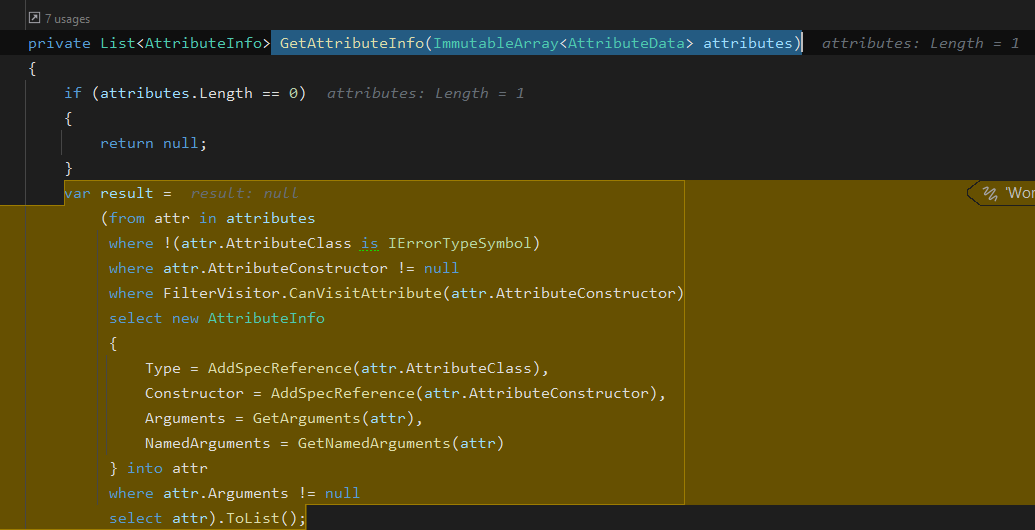
and here the AttributeClass is of type ErrorType with the message:

thus it does not even evaluate filters.
Now, I tried to adjust docfx.json to use .dll instead of .csproj but it doesn't help. (Although the error changes a bit)
{
  "metadata": [
    {
      "src": [
        {
          "files": [
            "MyProject.dll"
          ],
          "src": "../MyProject/bin/Debug/net7.0"
        }
      ],
...
Is there a way to work around this, or do we have to wait until DocFx supports .NET 7?
Describe the bug
Custom
filterConfig.ymlis not working after our projects were updated to .NET 7.To Reproduce
Steps to reproduce the behavior:
Expected behavior
Custom filter works.
Context:
OS: Windows 10
Docfx version: 2.59.4
.NET version: .NET 7.0
docfx.jsonconfig{ "metadata": [ { "src": [ { "files": [ "**.csproj" ], "src": "../MyProjectFolder" } ], "dest": "api", "disableGitFeatures": false, "disableDefaultFilter": false, "filter": "filterConfig.yml" } ], "build": { "content": [ { "files": [ "api/**.yml", "api/index.md", "api/**.md" ] }, { "files": [ "articles/**.md", "articles/**/toc.yml", "toc.yml", "*.md" ] } ], "resource": [ { "files": [ "images/**", "api/extra/*.jpeg", "api/extra/*.png", "api/extra/*.gif", "api/extra/*.jpg" ] } ], "overwrite": [ { "files": [ "apidoc/**.md" ], "exclude": [ "obj/**", "_site/**" ] } ], "dest": "_site", "globalMetadataFiles": [], "fileMetadataFiles": [], "template": [ "default", "templates/darkfx" ], "postProcessors": [ "ExtractSearchIndex" ], "globalMetadata": { "_enableSearch": "true" }, "markdownEngineName": "markdig", "noLangKeyword": false, "keepFileLink": false, "cleanupCacheHistory": false, "disableGitFeatures": false } }Additional context
We have a custom
filterConfig.ymlto exclude any
System.Objectinheritanceand to include attributes like
XmlElementorXmlAttribute.Now, after we updated our projects to .NET 7, the filter is not working anymore. DocFx generates all
System.Objectstuff and XML attributes are ignored. Just like if the custom filter is not there. When projects were targeting .NET 6 everything was working.I've tried to debug DocFx to at least get a hint of what is going on.
I've set a breakpoint in
SymbolVisitorAdapter.cs-GetAttributeInfo(ImmutableArray<AttributeData> attributes)and here the
AttributeClassis of typeErrorTypewith the message:thus it does not even evaluate filters.
Now, I tried to adjust
docfx.jsonto use.dllinstead of.csprojbut it doesn't help. (Although the error changes a bit)Is there a way to work around this, or do we have to wait until DocFx supports .NET 7?