You signed in with another tab or window. Reload to refresh your session.You signed out in another tab or window. Reload to refresh your session.You switched accounts on another tab or window. Reload to refresh your session.Dismiss alert
{{ message }}
This repository was archived by the owner on Dec 15, 2022. It is now read-only.
When a file with a non-standard file mode (such as 100755) is deleted the following is shown:
Although this message isn't technically wrong, it doesn't exactly sound right either.
Steps to Reproduce
Have a git repository with a file with a special mode specified on it.
Delete the file
Preview the file change
Expected behavior:
Since the file is being deleted entirely and this is shown by the deleted icon in the file list, as well as the entire contents being shown as removed, I think this entire file mode section should just not show.
For reference, files with the normal mode (100644) that are being deleted don't show this dialog.
Actual behavior:
A "file mode change" is shown saying it has been changed to undefined.
Reproduces how often:
100% of the time.
Versions
OS: Windows 10 x64 Enterprise
Github package: v0.12.0
Atom    : 1.26.0-beta1
Electron: 1.7.11
Chrome  : 58.0.3029.110
Node    : 7.9.0
apm  1.19.0
npm  3.10.10
node 6.9.5 x64
atom 1.26.0-beta1
python 2.7.14
git 2.17.0.windows.1
visual studio 2015
Additional Information
Handling of filemode changes was initially added in #1275.

Prerequisites
Description
When a file with a non-standard file mode (such as
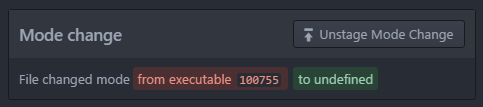
100755) is deleted the following is shown:Although this message isn't technically wrong, it doesn't exactly sound right either.
Steps to Reproduce
Expected behavior:
Since the file is being deleted entirely and this is shown by the deleted icon in the file list, as well as the entire contents being shown as removed, I think this entire file mode section should just not show.
For reference, files with the normal mode (
100644) that are being deleted don't show this dialog.Actual behavior:
A "file mode change" is shown saying it has been changed to
undefined.Reproduces how often:
100% of the time.
Versions
OS: Windows 10 x64 Enterprise
Github package: v0.12.0
Additional Information
Handling of filemode changes was initially added in #1275.